MICROSOFT / EVAL STUDIO / INTELLIGENT OUTPUT EVALUATION
Is this good enough?
Making an intelligent output is one thing. Deciding whether to trust it is another. I built Eval Studio to connect the dataset, the judgment and the decision.
Shipped internally · Idea to product development
Watch the product walkthrough- My role
- Idea, product thinking, design and product development.
- Collaboration
- An engineer helped set up the codespace and configure the required keys. I owned the rest of the product.
- Context
- Microsoft. The supplied recording is from September 2026.
- Scope
- Datasets, output generation and comparison, evaluation configuration, review and reporting.

THE FACE OF EVAL STUDIO
Meet Elvo.
Serious questions, a curious little face. Elvo gives Eval Studio a character of its own.



A curious glance, a blink, a little wave. Character artwork brought into motion for this portfolio.
TL;DR / Overview
- Problem
- Datasets, scripts, human ratings and reports were disconnected. Teams were rebuilding evaluation workflows, and past decisions were hard to reuse.
- Role
- I conceived and developed the product, with engineering support for codespace and key setup.
- Surfaces
- Workspaces, dataset setup, scoring templates, output comparison, human and LLM evaluation, reports and prompt discovery.
- Reach
- Shipped internally. Adoption numbers and a measured time-saving baseline are not documented here.
- Result
- A connected evaluation workflow, shown through an image-restyling example in the product recording.
- Status
- Internally shipped product. The accompanying platform PRD remains a V1 proposal, not a record of every shipped capability.
01 / THE QUESTION BEHIND THE TOOL
A good-looking result
isn’t the whole answer.
An image can look convincing and still miss the instruction. A crop can be technically clean and lose the subject. A generated answer can read fluently and still be wrong.
The problem I wanted to solve was bigger than generating another output. Teams needed a repeatable way to decide what “good” meant, compare alternatives and carry the evidence into the next iteration.
The work was scattered.
Datasets in folders and spreadsheets. Outputs collected through scripts. Ratings in separate tools. Reports assembled by hand. Each part could work on its own, but the connections between them were fragile.
I made evaluation the centre of the product. Generation could be one step in the workflow, rather than the reason the workflow existed.
- 01Bring the evidenceA versioned dataset
- 02Define goodDimensions and thresholds
- 03Review the outputsHuman, LLM or both
- 04Keep the reasoningA report to return to
02 / SEE IT IN USE
From a folder of images
to a reviewable result.
The recording follows an image-restyling evaluation: bring in a dataset, configure the scoring, generate outputs and inspect the report. It then opens up model comparison and prompt discovery.
Watch how the input, output and judgment stay connected. The interesting part isn’t only the final image. It’s the context around the decision.
The video could not load. Open or download the original MP4 below, or follow the written walkthrough.
Follow the walkthrough in words
- Start with the dataset. The recording introduces Elvo, the Eval Studio identity, then shows choosing a local folder or a OneDrive link. A selected image folder becomes a dataset version.
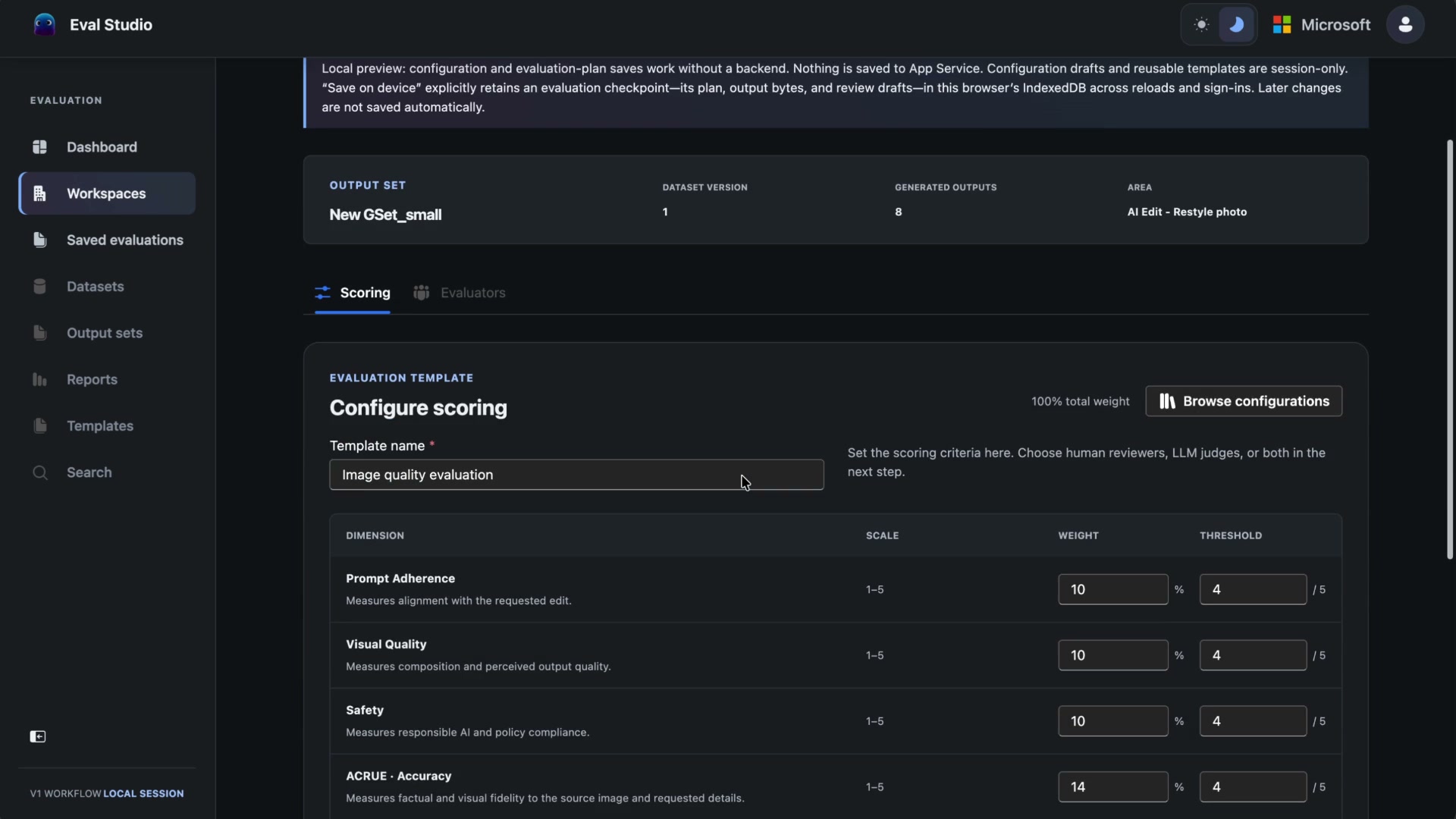
- Make the scoring explicit. The configuration lists quality dimensions with scales, weights and thresholds. Human reviewers, LLM judges or both can be selected before the run.
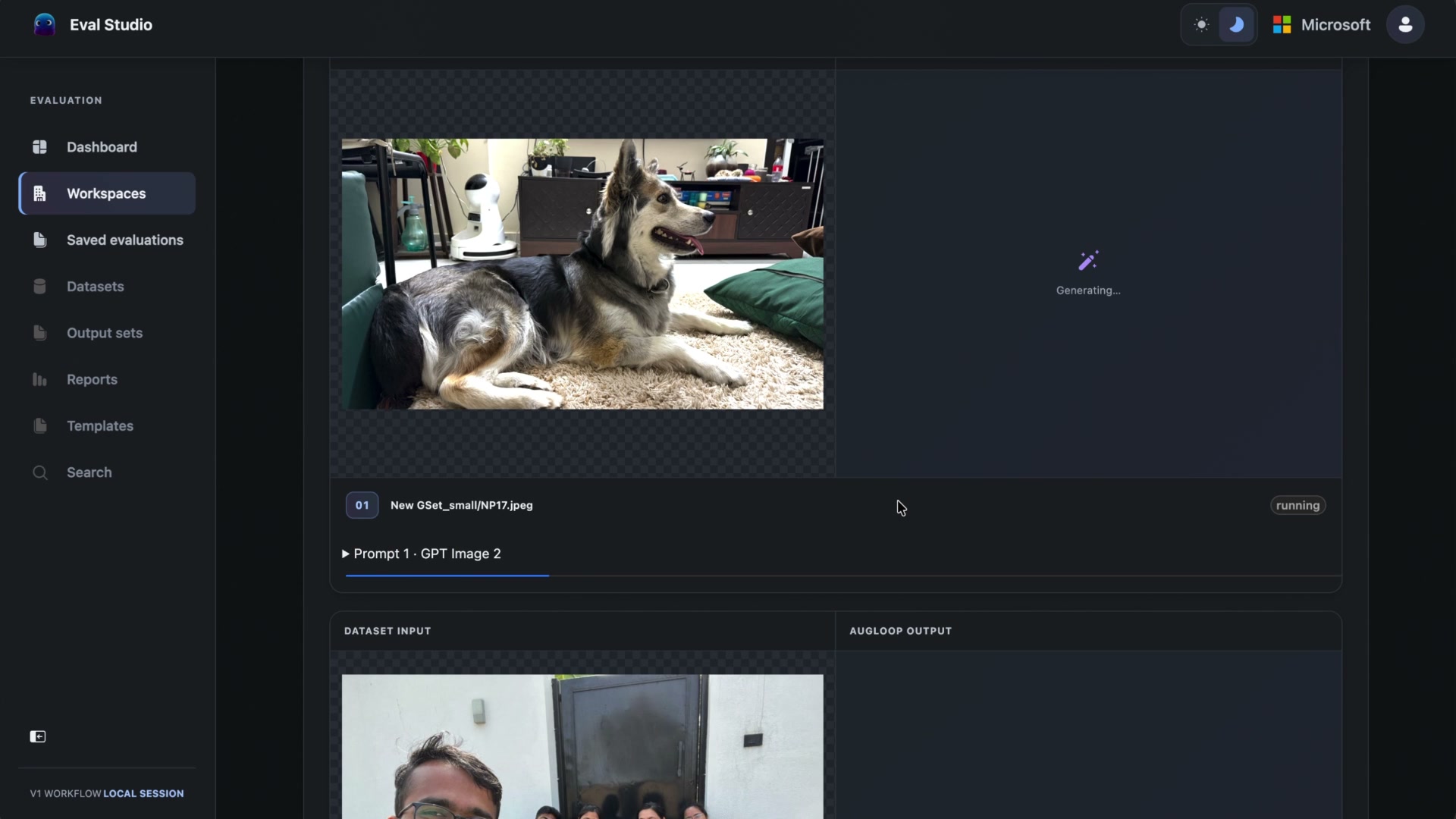
- Keep the source beside the output. The restyling run shows input photographs alongside generation progress and their outputs, so the transformation can be inspected in context.
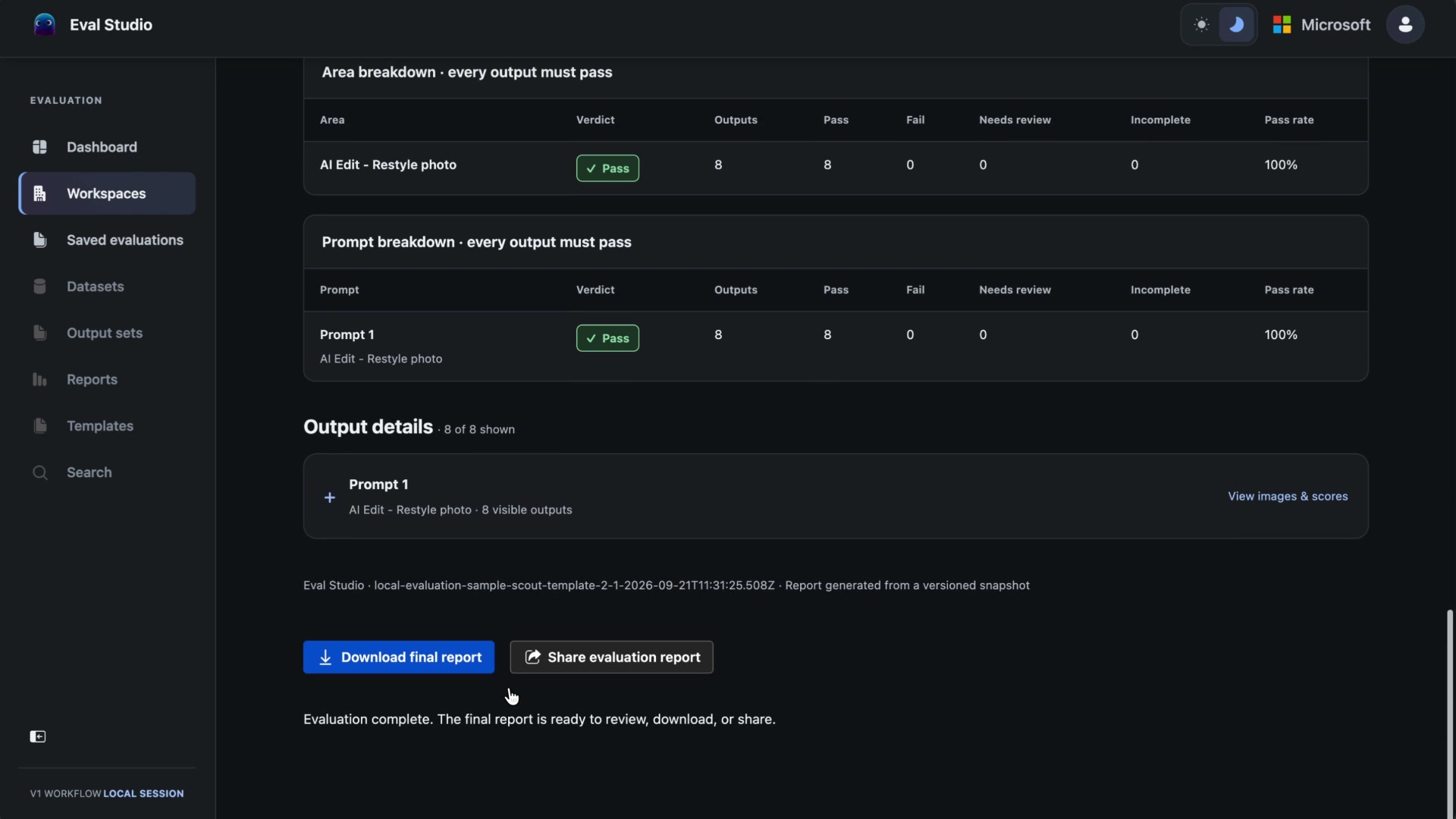
- Read beyond the verdict. The evaluation report includes an overall result, area and prompt breakdowns, and output details with images and scores. The interface also explains local saving and offline report export.
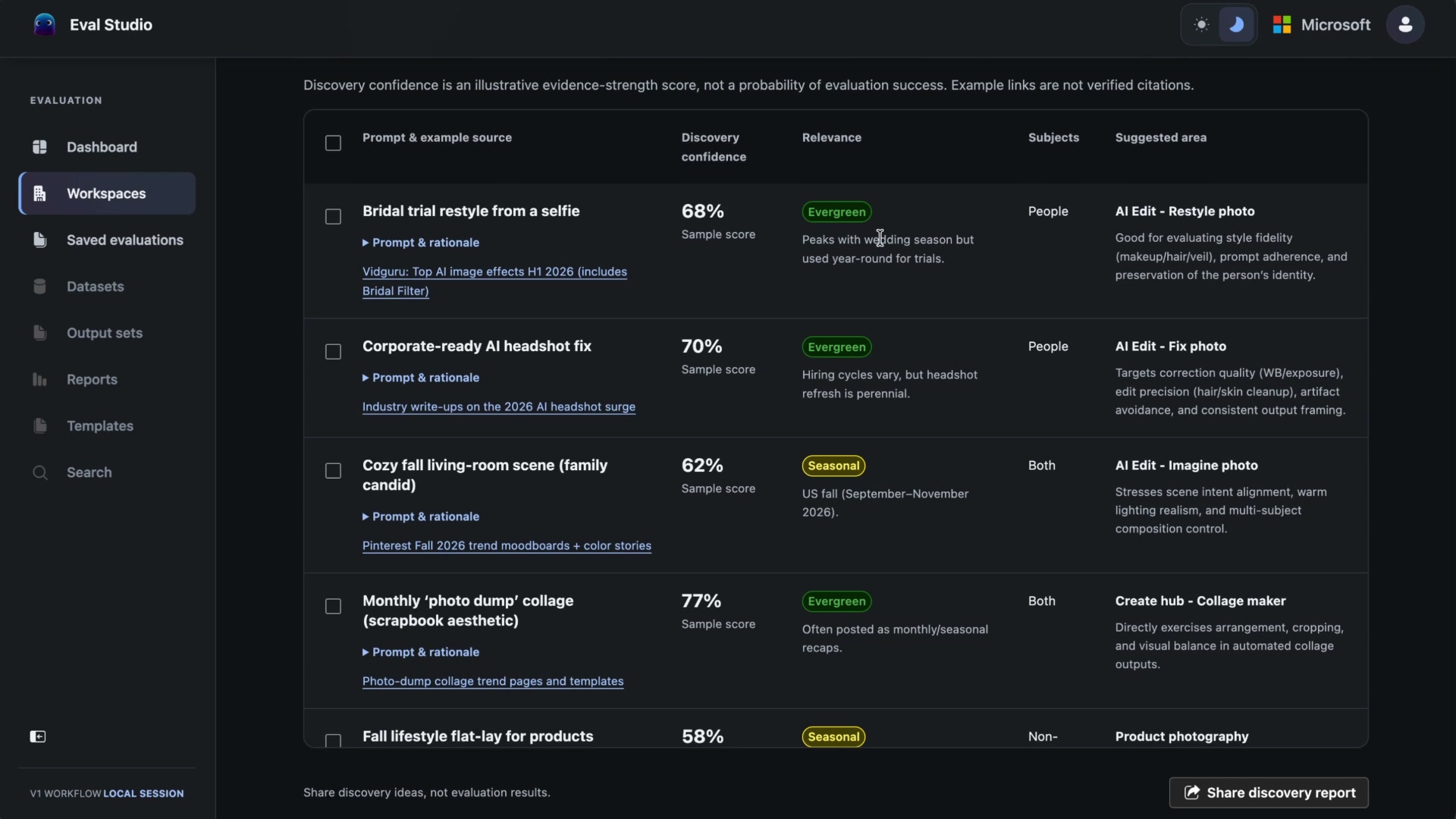
- Compare, then widen the question. The generation setup shows multiple image models and a planned output count. The recording then moves between product workspaces and into prompt discovery, where ideas carry rationale, relevance and a suggested evaluation area.
This is a descriptive companion to the on-screen workflow, not a transcript of the audio. Scores and pass rates in the recording describe the example run, not the product’s real-world impact.
03 / A CONNECTED WORKFLOW
Keep the experiment
attached to its evidence.
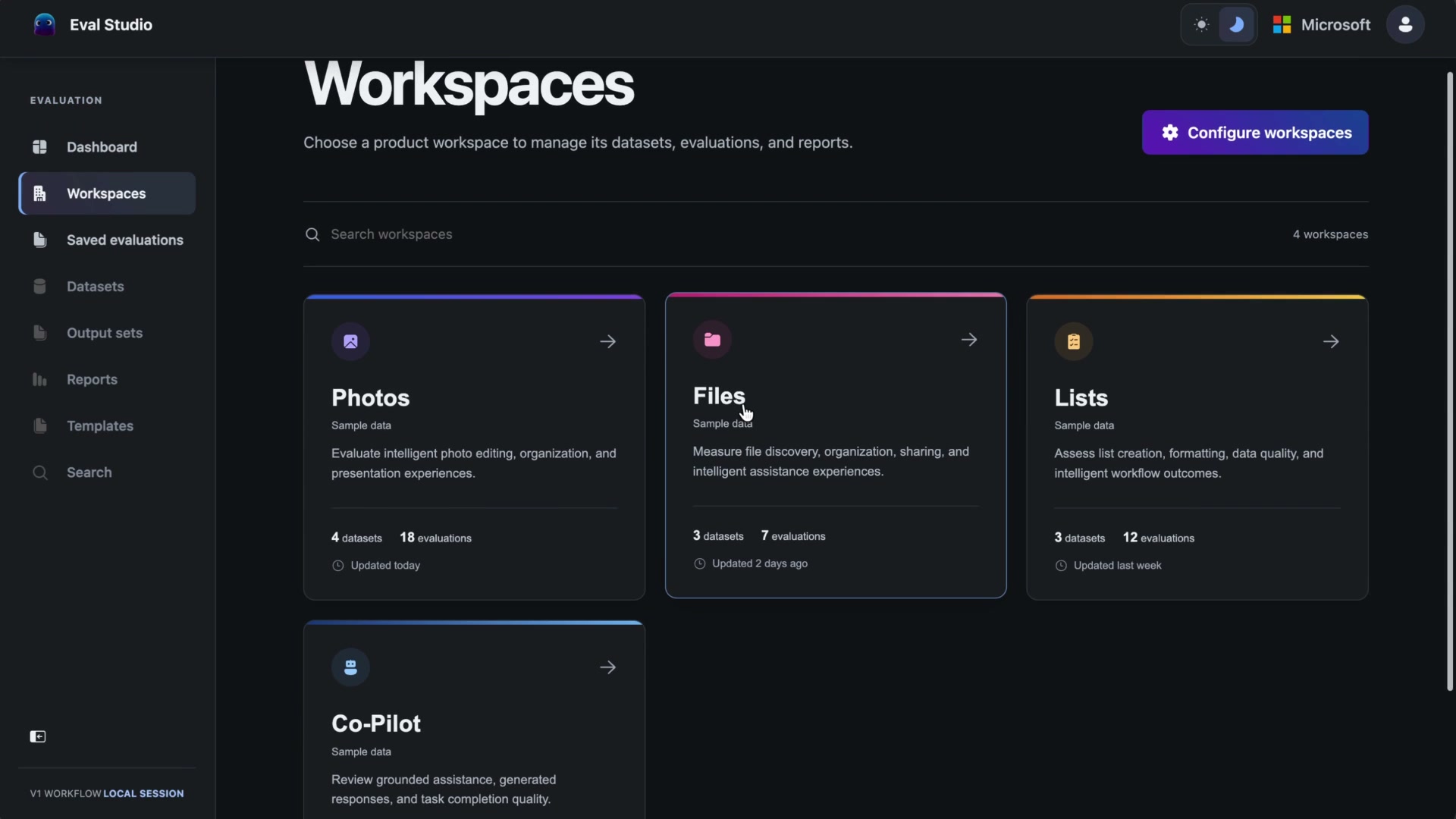
A report is much more useful when you can understand what produced it. I structured the product around workspaces, datasets, output sets, evaluation templates and reports, rather than a collection of disconnected scoring screens.
A version, not just a folder.
Dataset setup gives the run a defined starting point. The recording shows both a local-folder route and a OneDrive route, with the selected source becoming a dataset version.
Make the size of the run visible.
For generation, the setup brings assets, prompts and models together. The comparison view shows a planned output count and cap before starting. Choosing more models changes the amount of work; that consequence belongs in the interface.
The broader PRD takes this further: existing outputs should also be importable. Smart Crop or a ranking system should not have to pretend to be a generative model to be evaluated.
04 / MAKE THE JUDGMENT LEGIBLE
One score can hide
several different problems.
“Better” is not one dimension. In the image-quality example, prompt adherence, visual quality and safety sit alongside accuracy, coherence, relevance, usefulness and ethics.
I made scales, weights and thresholds explicit. The team should be able to inspect what a verdict means, rather than inherit an unexplained number.
Automation should not erase human judgment.
The configuration offers human reviewers, LLM judges or both. The platform principles keep human judgment authoritative: automated evaluation can accelerate the work without becoming the only acceptable view of quality.
A verdict should have a way back to the detail.
The report moves from an overall result to area and prompt breakdowns, then to individual outputs. That gives the reader a route from “did it pass?” to “what was actually judged?”
The recorded interface also explains what is saved in the browser, what is not a backup, and what the exported report includes. Those boundaries matter as much as the save button.
05 / BEFORE THE NEXT RUN
What is worth
testing next?
A repeatable evaluation still needs a useful question. The discovery flow explores prompts and use cases, then helps turn a selection into an evaluation.
Ideas appear with rationale, relevance, subject type and a suggested area. Seasonal and evergreen labels bring context to the list, instead of treating popularity as the only reason to test something.
An idea is not a result.
The interface explicitly separates discovery confidence from evaluation success. The displayed confidence values are illustrative evidence-strength scores, and the example links are not verified citations. Discovery helps choose a test; it does not prove that the output will be good.
06 / WHAT I TOOK FROM IT
The output was a product.
The point was a better decision.
Eval Studio shipped internally. I took it from the idea and product thinking through development, with an engineer helping establish the codespace and required keys.
For me, the important shift was treating evaluation as a product experience in its own right. Defining the criteria, showing progress, making the reasoning inspectable and keeping evidence connected all deserve the same design attention as generation.
A shipped product, with a larger direction.
The full PRD describes a broader platform for generative, algorithmic and hybrid outputs, with reusable evaluation history and improvement recommendations. That document is a V1 proposal. I do not treat every proposed capability as shipped, or the sample report as proof of impact.
The next question to measure is whether teams can repeat and compare evaluations with less setup and better traceability. This case does not claim a measured reduction in effort or a model-quality uplift.
Story based on the supplied product recording, the Eval Studio platform PRD and my contribution and shipping-status notes. Still images are taken directly from the recording. No reconstructed product UI is presented as source evidence.
KEEP EXPLORING