LOOM / CROSS-TEAM DESIGN DISCOVERY
Before you ask around
I built Loom to show the design work already happening across teams: who owns it, where it stands, and where to find the source. Designers update that context in Figma; everyone else discovers it in the web app. The team is already adopting it.
Loom makes existing work discoverable; it doesn’t generate design alternatives. That is the separate DINO workflow.
- Role
- Concept, product design and development.
- Collaboration
- Solo project.
- Period
- September 2026.
- Scope
- Figma status plugin and a Photos-focused design-discovery web app.
The Loom video could not load. Try the download link above, or read the narration and walkthrough below.
The captions could not load. Read the narration below instead.
Read the narration
Automatically transcribed locally, with light edits to product names and punctuation. Minor transcription errors may remain. The walkthrough below also describes what is on screen.
We know design doesn’t happen in isolation. But when we talk about collaboration, we often think about the immediate triad: design, product and engineering. The reality is, there’s another layer of collaboration happening all the time. You might be designing something that builds on work from another team. A decision made on another project might change the experience you’re creating. Or you might see something another designer is working on and have context that could help.
The problem is, you don’t always know what’s happening. So you look for context. And eventually, a Teams message. What if you didn’t have to search or ask? Meet Loom. One place to see the design work happening across your organization. What’s being explored? What’s in progress? Who’s working on it? What needs review? What’s been aligned? And what’s ready to build? Loom connects the pieces for you.
But where does all of this context come from? Loom isn’t just another place designers have to keep updated. Loom starts where the work already happens, in Figma. Through a simple plug-in, designers mark what they’re working on and where it stands. As the work moves, they update its status right there. And Loom reflects those updates in the portal.
So the organization gets a living view of design work while designers stay in their existing workflow. Discovery is easy, and so is keeping it current. Because Loom isn’t asking designers to document their work somewhere else. It’s making the work they’re already doing easier to see, connect and build on.
Loom. See the work. Connect the dots. Move together.
TL;DR / Overview
- Problem
- Design context was scattered across files, delivery boards and conversations, making related work difficult to discover.
- Role
- Solo concept, product and interaction design, and development.
- Surfaces
- Figma plugin, discovery web app and linked Azure DevOps delivery context.
- Reach
- The team is already adopting Loom for design discovery.
- Result
- A working product connecting Figma files to a searchable, shared view of design work.
- Status
- Working and in use, with team adoption underway.
01 / The missing context
The work was there.
The connections were harder to see.
A design rarely affects only its immediate team. It might build on someone else’s work, depend on a decision elsewhere, or benefit from context another designer already has.
I wanted those connections to become visible before the next review or status message. Loom brings the design, its owner, its stage and its delivery context into one place, while keeping Figma and Azure DevOps as the sources of the work.
02 / What the demo shows
Find the context.
Go back to the work.
The recording moves from the collaboration problem to the Photos discovery page, then into the Figma plugin and back. It shows the working product and the connected workflow behind it.
- 00:00 / The problem
More than the immediate team.
Animated connections, scattered screens and a Teams message introduce the difficulty of finding relevant work and people.
- 00:44 / Discover
One place to look.
The Photos overview shows active designs. An initiative opens into its owner, source links and separate design and engineering states.
- 01:17 / Connect
Start in the Figma file.
The plugin finds existing work and connects a new Create Hub initiative to the current design file and an ADO feature.
- 01:33 / See it together
The shared view catches up.
The connected initiative appears in Loom. Its detail view carries the source context, and a stage filter narrows the work ready for review.
03 / Two important choices
A shared view.
Not another tracker to feed.
I separated the place where designers update their work from the place where everyone discovers it.
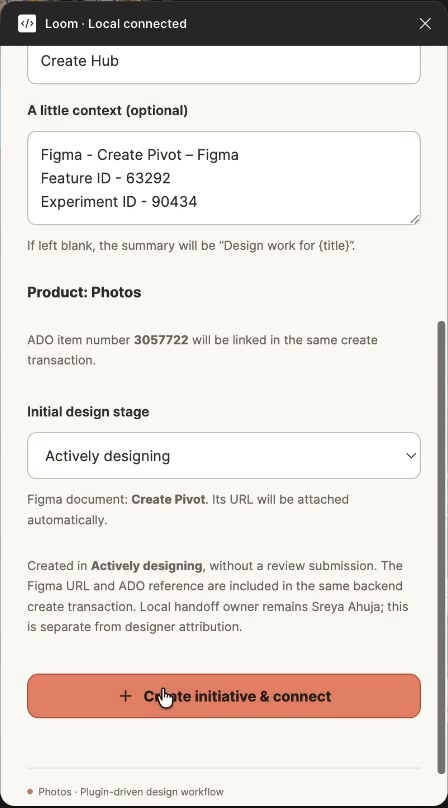
Keep the update close to the making.
The plugin connects the current file to an initiative and lets its designer set the design stage. The web app is for discovery: browse, search, filter, follow and return to the source.
That keeps Loom from becoming a second version of the same workflow. The Photos experience brings the design context together without moving the work out of its existing tools.
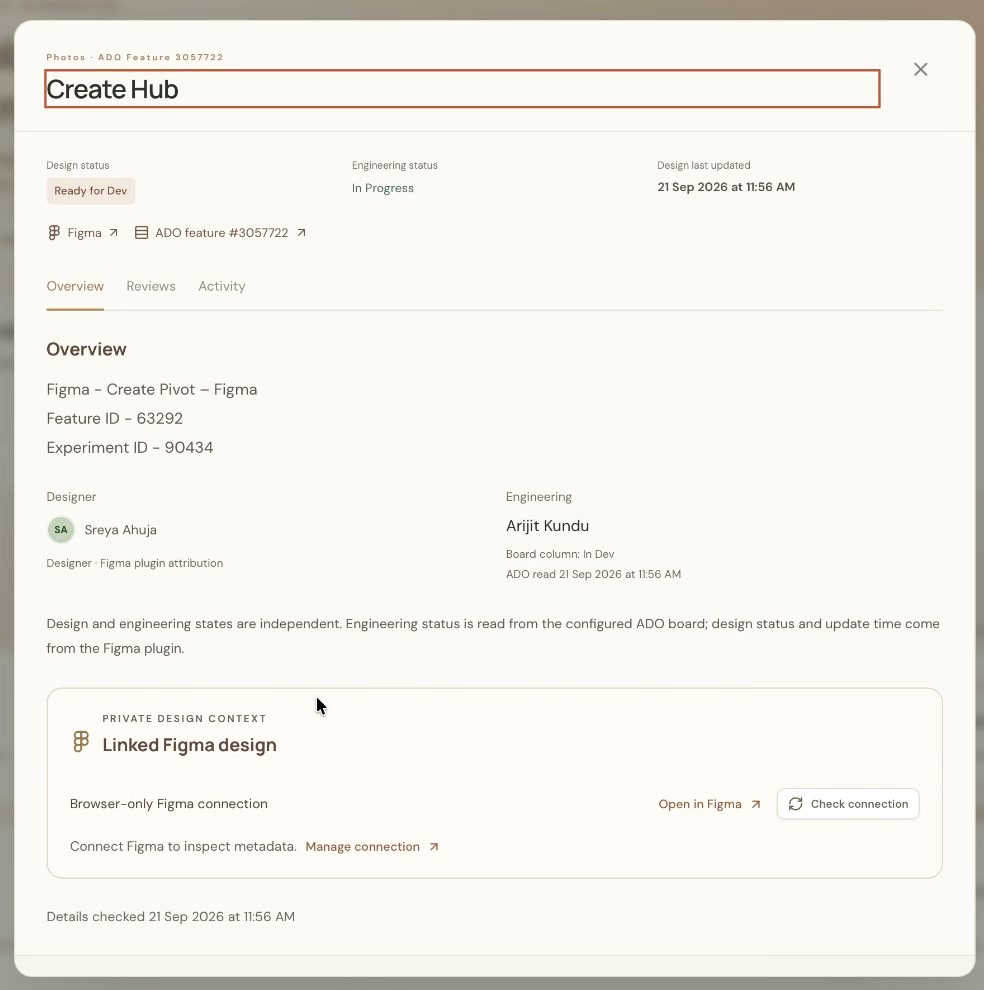
Don’t let “ready” mean two things.
A design being ready for development does not mean engineering has finished building it. Loom shows the designer-declared stage beside delivery state read from Azure DevOps, with the source and update time visible.
Meaningful transitions still need a person’s judgment. A delivery refresh or review notification should not silently approve a design or declare it ready for handoff.
04 / Where it stands
Built end to end.
Already in use.
I took Loom from the product idea through the interface and working code: a Figma plugin, a React web app, and an Express and SQLite backend.
Loom is a working product, and the team is already adopting it. Designers update their work in Figma, while the shared view makes that context available to the people around them.
This story draws on my requirements documents, September 2026 source project and original demo, with the current team-adoption status added in October 2026.
Keep exploring